Lead Capture Popups: From Trigger to Multi-Step Form
Most websites don’t have a traffic problem - they have a leaving problem. Visitors arrive interested, scroll a bit, consider taking action, and then leave without doing anything.
That moment - when someone is interested but hasn’t acted yet - is where most websites fail. The visitor disappears without leaving an email, without starting a form, without giving you any way to follow up.
This is exactly the gap a lead capture popup is meant to close.
Instead of hoping visitors notice a form somewhere on the page, a popup steps in at the right moment and presents one clear offer. No navigation. No distractions. Just a simple question and an easy next step.
When popups work, it’s not because they’re aggressive or annoying. It’s because their timing, design, and trigger align with visitor behavior. Get those three right, and a popup turns passive browsing into action - capturing leads that would otherwise be lost.
What is a lead capture popup ?
A lead capture popup (also known as lead generation popup) is a window that appears on your site just as visitors are about to leave.
It grabs their attention and asks for their contact info before they go. If they’re interested, the popup sends them to your multi-step form to fill in their details.
- Name
- Phone number
- Anything else you need to follow up
Popups work because they catch attention at the right time.Lead capture popups can convert 3% to 10% of your traffic. Exit-intent popups alone can bring back 10-15% of visitors who were about to leave.
How does the lead capture popup work ?
Lead generation popups appear at the right time to collect information before visitors leave.
They make it less likely that someone will leave without sharing their contact details.The process has four parts:
- The Trigger - when the popup appears
- The Interaction - what happens when someone sees a popup
- The Form Completion - filling out the actual form fields
- What Happens After - following up with leads
The Trigger
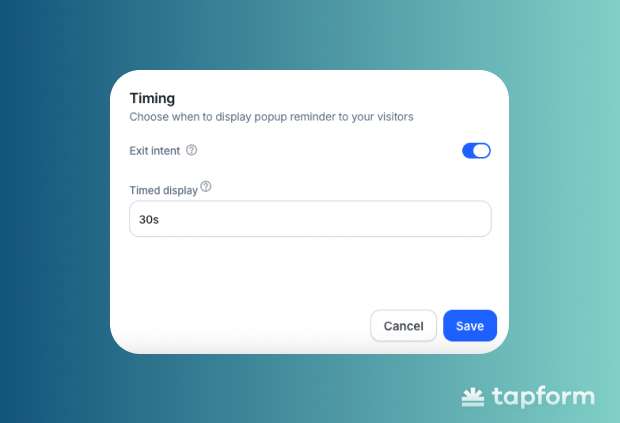
Popups trigger based on visitors' actions. The two most common triggers are time-based and exit-intent trigger.
Time-based triggers show a popup after someone has been on your page for a set time (Usually around 30 seconds).
Exit-intent triggers capture users just as they are about to leave, when the cursor moves toward the close button or back arrow. This is your last chance to convert them. Based on how far someone scrolls or when they click something.
The Interaction
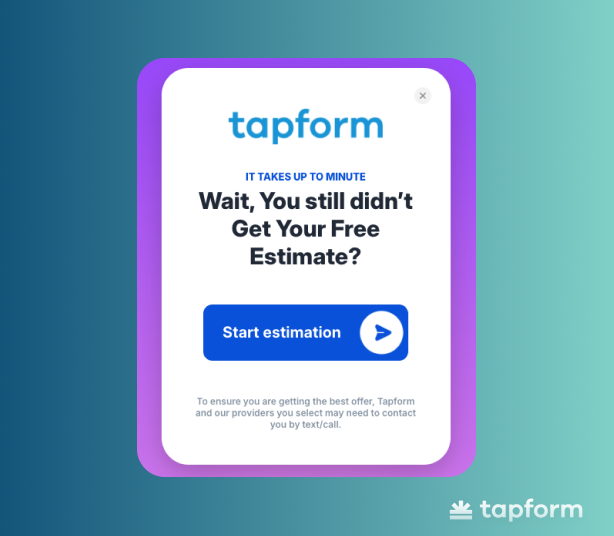
Show the benefit of your popup immediately. A text like "Wait, You Still Didn't Get Your Free Estimate?" creates urgency and reminds visitors why they came.
Your CTA button should make it clear what happens next. Phrases like "Start Estimation" or "Get Your Quote" work because they are direct and action-focused.
The Form Completion
When visitors click, they see your form. This is your chance to get their information and turn them into leads. Use a multi step form to collect details such as:
- Name
- Phone
- Any other info you need
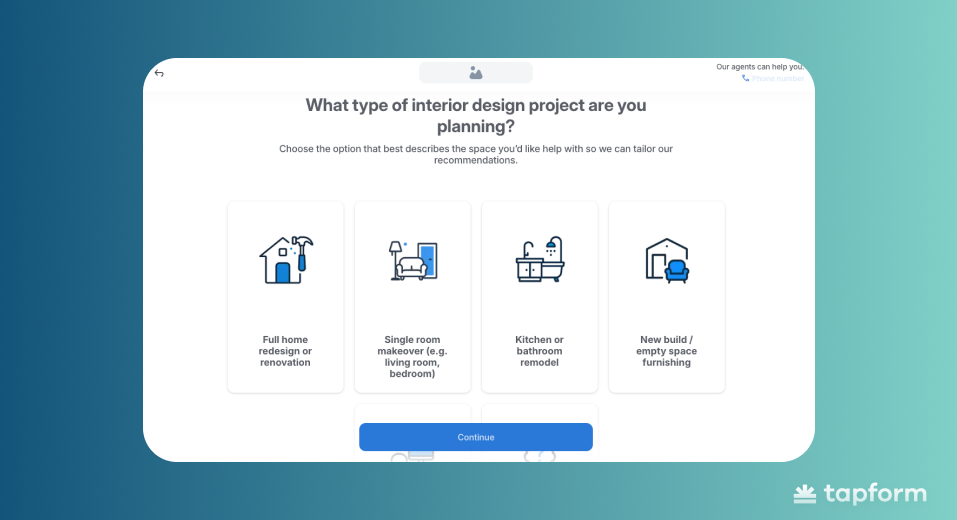
Multi step forms usually work better than single page forms. They break fields into steps, so users do not feel overwhelmed.
If the popup worked as intended, the visitor submitted their information through a multi-step form.
Their details go straight into your system as soon as they hit submit. Now you have turned a casual visitor into a lead you can follow up with.
How to create Lead Capture Form Popup
You can create lead capture popups without coding by using tools like TapForm.
These platforms let you set triggers, customize the design, write your copy, and get embed codes, all without touching HTML or JavaScript. In the video below, you’ll see an example of a lead capture popup form in action.
How to design lead capture form Popups
Your popup design affects whether visitors engage or close it. Button text, background color, text color, and corner radius all matter.
Button text should make it clear what happens when they click. Options like "Start Estimation" or "Get Your Quote" set expectations. Vague labels like "Submit" or "Click Here" can make people hesitate.
The button's background color should stand out. Strong contrast between the button and popup background makes it clear where to click. If colors blend, visitors have to search for the action, and that extra step can lower conversions.
Button text color must be easy to read. It sounds obvious, but it is easy to miss. High contrast between text and background keeps things clear.
Corner radius gives buttons a modern look. Rounded corners of 4-8px work well. Sharp edges can look outdated, but a slight curve makes buttons more inviting.
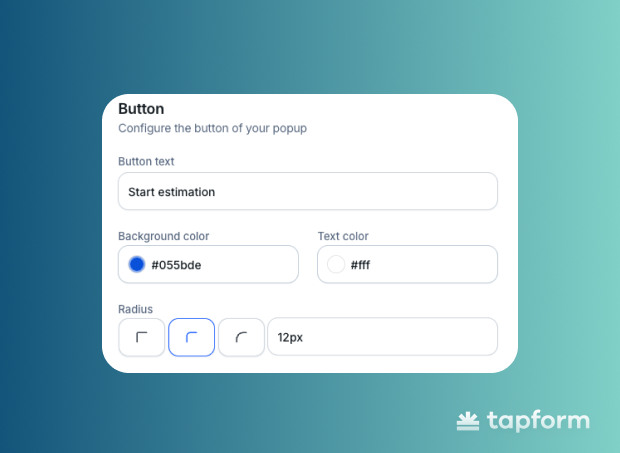
Test different combinations to see what works for your audience. Make sure your popup is clear and easy to spot.
Types of Lead Capture Form Popups
Not all lead capture popups work the same way. The type you choose depends on when you want to engage visitors and what you offer.
Here's a quick breakdown:
| Popup Type | How It Works | Best For |
| Based on Trigger | ||
| Exit-Intent | Appears when visitors are about to leave | Recovering abandoning visitors |
| Timed | Shows after a set time on page (e.g., 30 seconds) | Blog posts, landing pages with browsing behavior |
| On-Click | Triggered when someone clicks a specific element | Lead magnets, downloads, special offers |
| Scroll-Based | Activates at certain scroll depth (50-75%) | Long-form content showing engagement |
| Based on Content & Goal | ||
| Discount/Offer | Offers percentage off or limited-time deal | E-commerce product pages, checkout |
| Lead Magnet | Free resource in exchange for email | Educational content, solution-seeking visitors |
| Gamified | Interactive experience (spin-to-win, scratch cards) | Standing out in competitive markets |
| Welcome | Appears immediately for first-time visitors | Homepages with strong first-time offers |
| Webinar/Event | Promotes upcoming events with deadline | Filling event seats with qualified leads |
Understanding both categories helps you pick the right popup for your situation. Match the trigger to visitor behavior and the content to their intent, and conversion rates improve.
Based on trigger
Earlier in this guide, we covered the basic trigger types. Now let's break down how each one actually works and when you should use them.
Trigger-based popups activate depending on what visitors do on your site. The one you choose decides when people see your popup. You can also combine multiple triggers for more precise targeting.
The four main types:
- Exit-Intent Popups — catch people about to leave
- Timed Popups — show up after a set time
- On-Click Popups — appear when someone clicks something
- Scroll-Based Popups — trigger at a certain scroll depth
Exit-Intent Popups
Exit-intent popups appear when someone's about to leave. They detect cursor movement toward the close button or back arrow.
These work because you're catching people who are already leaving anyway. You're not interrupting their browsing - you're giving them one last reason to stay.
Exit-intent popups typically get better engagement because they target visitors who've already shown some interest by spending time on your page.
Use these when you want to recover abandoning visitors with a final offer or reminder.
Timed Popups
Timed popups show up after someone's been on your page for a set amount of time. Usually 30 seconds or so.
You need to set the timing right, or it just becomes annoying. Give visitors a chance to get familiar with your content first. If they haven't taken any important action - like clicking a button or starting your form - that's when the popup appears and pushes them to the website's multi-step form.
Check your GA4 to see where people spend the most time on your site, then experiment with different popup timings on those pages. What works on a blog post might not work on a product page.
On-Click Popups
On-click popups appear when someone clicks a specific button, link, or element. The visitor chooses to see the popup by clicking something.
Since they initiated the action, on-click popups usually convert better. People are already interested and expecting something to happen.
Use these for lead magnets, downloadable resources, or special offers where visitors actively want more information.
Scroll-Based Popups
Scroll-based popups trigger when someone scrolls to a certain point on your page. Usually 50% or 75% down.
If someone scrolls that far, they're interested in your content. These work well on long-form pages like blog posts, guides, or case studies where scroll depth shows genuine engagement.
Use these on educational content or long landing pages where scrolling indicates real interest.
Based on content and goal
This is about what you're actually offering visitors. Pick the type based on what you're trying to accomplish and what your audience responds to.
Six main types:
- Discount or Offer Popups
- Lead Magnet Popups
- Gamified Popups
- Welcome Popups
- Webinar or Event Popups
Discount or Offer Popups
Discount popups give people a deal. Could be a percentage off, free shipping, whatever limited-time offer you're running. For e-commerce, these work because price is always a factor.
Your offer has to be worth an email address. "10% off your first order" is straightforward - people know exactly what they're getting.
These fit best on product pages or at checkout. A small incentive at the right moment turns someone browsing into someone buying.
Lead Magnet Popups
Lead magnets are free resources you give away. Guides, templates, checklists, reports - anything that solves a problem without asking for money.
Make it specific. "Free SEO Checklist for Small Businesses" tells people exactly what's inside. "Download Our Guide" doesn't.
Put these on pages where people are hunting for solutions or trying to learn something.
Gamified Popups
Gamified popups make the whole thing interactive. Spin-the-wheel, scratch cards, little games where people "win" a discount.
They work because they're different. People engage more when there's an element of fun. Plus, winning something - even a 10% discount - feels better than just being offered one.
If you're in a crowded market where everyone's running generic popups, this is how you stand out.
Welcome Popups
Welcome popups show up the second someone lands on your site. Usually just for first-time visitors.
Your offer better be strong if you're interrupting right away. "Get 20% Off" or "Join 10,000+ Marketers" at least gives people a reason to pause.
Homepages and landing pages work for these. First impressions matter, and you need something solid to offer.
Webinar or Event Popups
Webinars, demos, training sessions - these popups are about filling seats for events.
The urgency helps. "Register for Thursday's Webinar" has a deadline attached. That pushes people to act instead of thinking about it later.
Good for when you need qualified leads who actually want to learn more about what you do.
Does lead capture form popup increase websites conversions ?
Yes. Well-designed popups increase conversions significantly.
Popups work because they create a focused moment. Instead of hoping visitors find your form somewhere on the page, the popup brings it directly to them at the right time. Data shows that well-timed popups convert between 3-10%, and exit-intent popups alone can recover 10-15% of abandoning visitors.
The key is doing it right. Timing needs to match visitor behavior. The offer needs to provide real value. Design needs to be clean and professional. When these elements align, popups turn passive browsing into active engagement and increase the quality of leads entering your funnel.